MotionDesk™
ORMEC's MotionDesk™ Development Kit provides a complete motion programming environment on any PC running Windows XP, Windows 7 in XPMode, and Windows 10. The MotionDesk™ Development Kit provides software tools to simplify the configuration, development and maintenance of ORION® motion control systems.
MotionDesk™ is a fully integrated, Windows-oriented desktop for motion control. It uses drop-down menus, toolbars and dialog boxes to provide an intuitive graphical user interface to ORION® controllers.
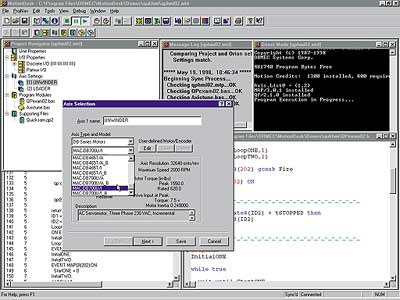
Multi-Window Development
The MotionDesk™ Development Console provides a multi-window development environment that includes multiple local windows on your PC as well as a multi-window interface to your motion controller.
MotionDesk™ uses TCP/IP (Transmission Control Protocol/Internet Protocol) to implement high speed serial communications with ORION® motion controllers. TCP/IP enables MotionDesk™ to simultaneously open multiple communication channels with ORION® and provides windows to modify, control and view program operation.
Project Navigator
The ORION® Project Navigator simplifies configuration of the ORION® system. It includes multiple screens for unit and axis parameters as well as servo gearing and I/O configurations.
A software wizard provides a series of screens that simplify configuration.
MotionPad Editor
The MotionPad program editing tools and macro capabilities help speed program development. MotionPad features include:
- Context-sensitive help on menus, toolbars and MotionBASIC® keywords
- Colored emphasis of MotionBASIC® keywords to highlight programming problems during editing
- Comprehensive text editing and file management capabilities
- Multiple file, multiple window editing
- Multi-level undo capability
MotionPad activates when a programming error is detected during a ORION® controller system test. The errors are presented in a MotionPad window and indicate the module and the source line causing the error.
Windows Help
The MotionDesk™ Help System utilizes the latest Windows-based tools to provide on-line access to ORION® information – MotionBASIC® reference information, MBX reference information and MotionDesk™ Help all in one system. Full text searching capabilities, multi-level folders which provide a graphical interface for exploring topics.
File Management
MotionDesk™ provides a full set of file management utilities for managing ORION™ files.
Upgrade Director
The installation of the latest version of MotionBASIC® or a MotionBASIC® Extension, along with the appropriate Help files, is easy with the Upgrade Director. Integrated into the MotionDesk™ environment, the Upgrade Director presents a menu that allows installation of only what is need for your application. In addition to upgrades, all MotionBASIC® extensions are available in the Software Support Library.
Axis Tune
Programming is not required to tune the motor/drive systems to the system load. Built-in and user modifiable motion profiles, with default parameters, are automatically adjusted to meet your system inertia load requirements. This provides quick and easy fine-tuning of the system loop response. All modifications to loop parameters are implemented dynamically with visual feedback on the integral color scope. Final adjustments can be stored in the project configuration file.